Water Eject Sound & Speaker Test Tool

How to Remove Water From Your Phone Speaker Using a Water Eject Sound

Got water in your phone speaker? Play our free speaker cleaning sound to help move trapped water away from the speaker area. If you are using an iOS device, check our specialized iPhone Water Eject sound guide. When the sound stops, test your speaker and check if the audio is clearer.

Sound playback cannot detect moisture, dry internal components, clear a charging port or repair liquid damage.

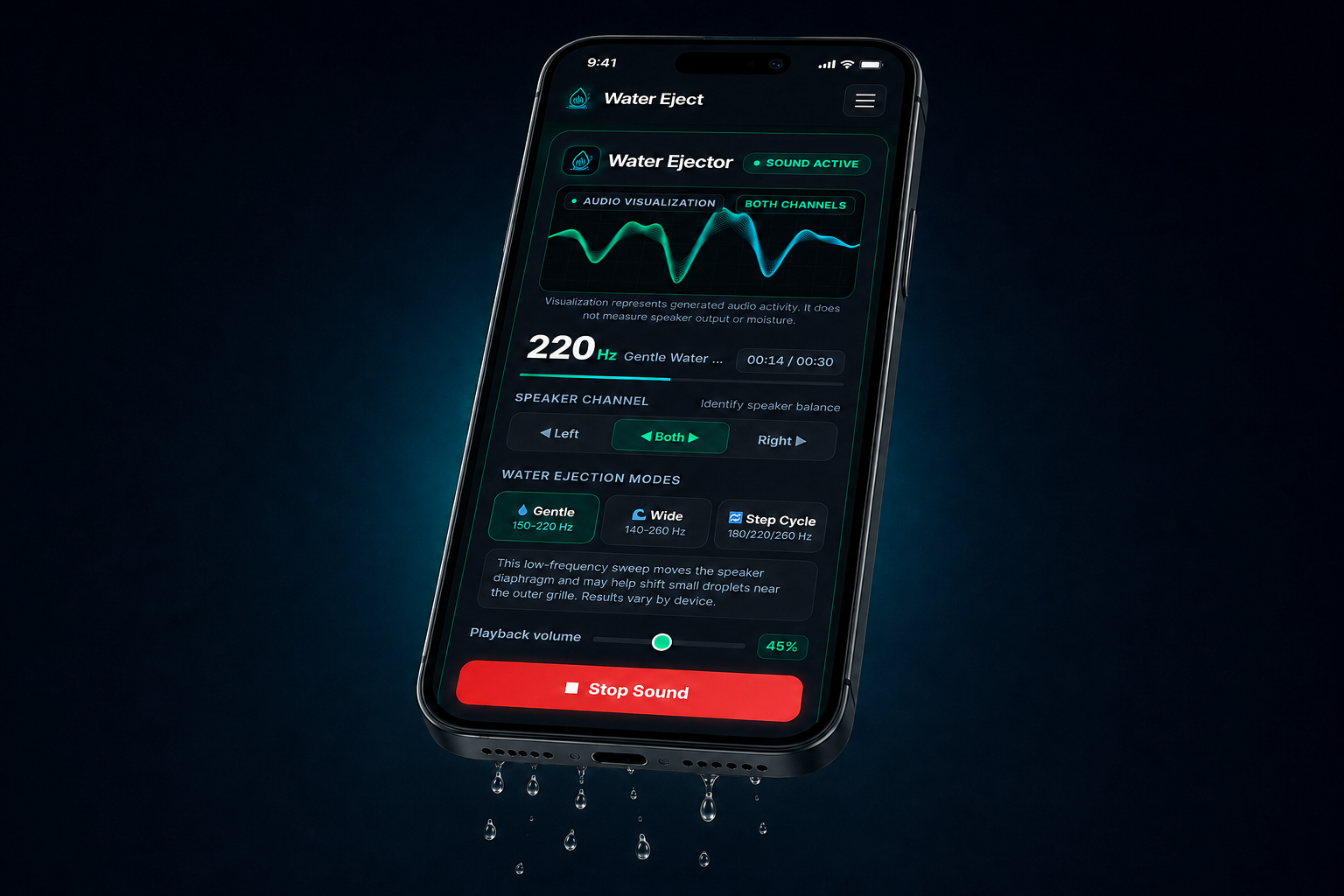
Water Ejector

Ready
Audio visualization Both Channels

Visualization represents generated audio activity. It does not measure speaker output or moisture.

165Hz

Gentle Water Sweep

00:00 / 00:30
Speaker Channel Identify speaker balance

This low-frequency sweep moves the speaker diaphragm and may help shift small droplets near the outer grille. Results vary by device.

45%

Was the phone submerged? Do not rely on sound playback after serious submersion. Follow manufacturer instructions.

How Does the Water Eject Sound Help?

When you play the sound, it makes your phone’s speaker vibrate. These vibrations can help push trapped water toward the speaker opening. Keep your phone’s speaker facing downward while the sound plays, and run it again if the audio still sounds muffled.

Water droplets falling from a phone speaker while the Water Eject sound tool is running

How to Use the Speaker Water Removal Tool

Using the tool only takes a minute. Open it on your phone, choose a frequency mode, and play the sound by following these steps:

01

Open the Water Removal Tool

Open the tool in your phone’s browser. There’s nothing to download or install.

02

Point the Speaker Downward

Remove any connected headphones, then hold your phone with the speaker pointing down so the water has somewhere to go.

03

Choose a Frequency Mode

Start with Gentle Mode if only a little water entered the speaker. If the audio still sounds muffled, try Wide Mode or Step Cycle.

04

Adjust the Volume

Turn the volume up slowly until you can hear the tone clearly. There’s no need to use full volume.

05

Play the Sound

Tap the play button and let the sound run. Keep your phone still while it plays.

06

Check the Speaker

Play some music or a video to check the sound. If it still sounds muffled, run the speaker cleaning sound again and give the phone more time to dry.

Six-step Water Eject guide showing frequency selection, volume control, sound playback and speaker testing

How This Speaker Water Removal Method Compares With Other Options

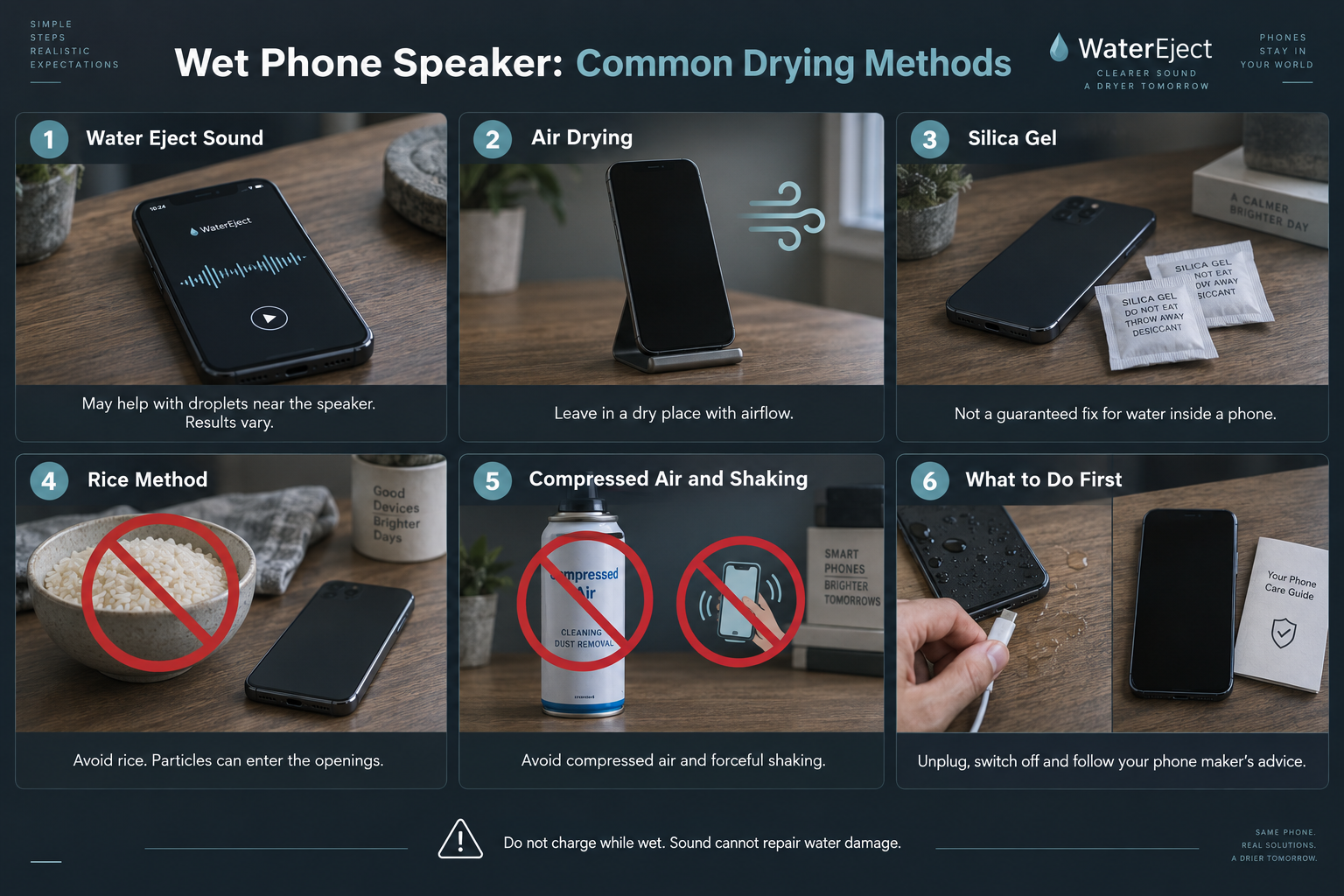
After your phone gets wet, there are several ways people try to fix the speaker. Some methods focus on drying the phone, while others try to remove water that is affecting the sound. Here’s how the most common options compare.

01

Water Eject Sound

If your phone speaker sounds muffled after getting wet, this sound-based method may help clear water around the speaker area. It works best when your phone is working normally but the sound is not clear. Explore our dedicated iPhone Water Eject and Android Water Eject guides for step-by-step instructions.

02

Air Drying

Leaving your phone in a dry place can help the water go away over time. It is a safe method, but it does not push water out of the speaker.

03

Silica Gel

Silica gel packets can help after your phone gets wet. They are useful for drying, but they cannot remove water that is already inside the speaker.

04

Rice Method

Putting a phone in rice is a common trick after water damage. It may help with some water around the phone, but it is not a reliable way to fix a wet speaker.

05

Compressed Air and Shaking

Compressed air and shaking may seem like easy fixes, but they can make things worse. They may move water further inside the phone instead of getting it out.

06

Which Method Should You Try First?

If your speaker sounds muffled after getting wet, try a speaker cleaning sound first. Other methods can help, but they usually need more time. If dirt or fine debris is causing muffling rather than moisture, run our Speaker Cleaner. If severe sound distortion or internal moisture persists, consult our Support resources or an authorized repair specialist.

Water eject sound, air drying and silica gel compared with rice, compressed air and shaking, with warning signs on methods to avoid.

Supported Devices

You can use this browser-based speaker cleaning tool on smartphones that support audio playback. It works with many popular phone brands, including:

Compatibility Note

The tool experience can be different depending on your phone model, browser, software version, and speaker condition.

Water in Charging Port: What Should You Do?

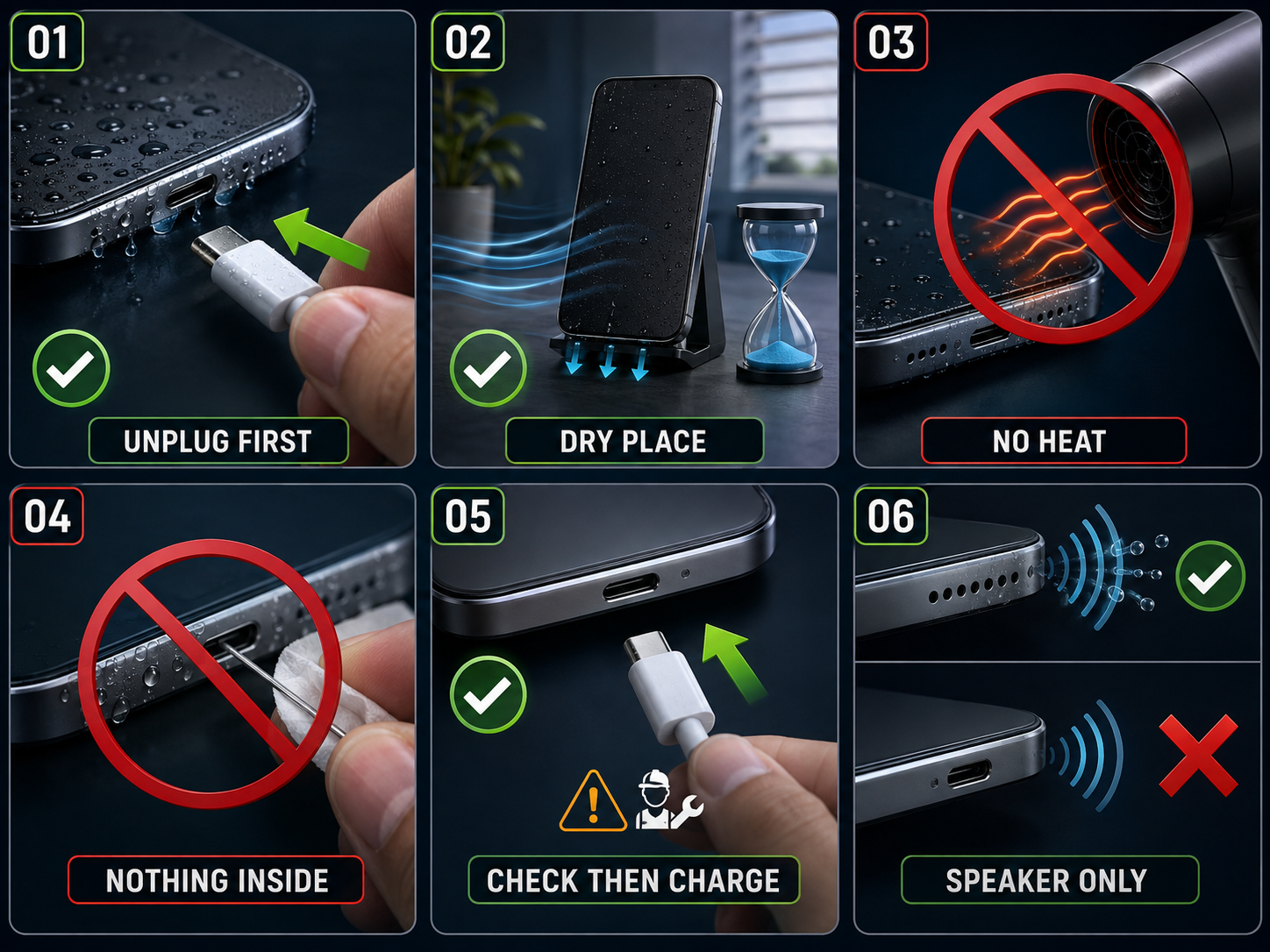
If water gets into your phone’s charging port, avoid charging the device until the port is dry. This tool only works through the phone speaker. It does not remove water from the charging port or other parts of the phone.

01

Remove the Charger

If your phone is connected to a charger after getting wet, unplug it first. Wait until the charging port is dry before charging your device again.

02

Let the Charging Port Dry

Keep your phone in a dry place and allow the charging port to dry naturally. Avoid using heat or force to dry the port.

03

Avoid Putting Anything Inside the Port

Do not use pins, tissues, or other objects inside the charging port. This can damage the port.

04

Check Before Charging Again

After the port is dry, try charging your phone. If it still shows a warning or does not charge, the issue may need further checking.

05

Can Water Eject Sound Remove Water From Charging Port?

No. Water eject sound only plays audio through the phone speaker. It can help with water around the speaker area, but it does not remove water from the charging port or inside the phone.

Six-step safety diagram showing how to unplug a wet phone, let the charging port dry naturally, avoid heat and inserted objects, check before charging, and use water-eject sound only for the speaker.

When Should You Not Use This Speaker Cleaning Sound?

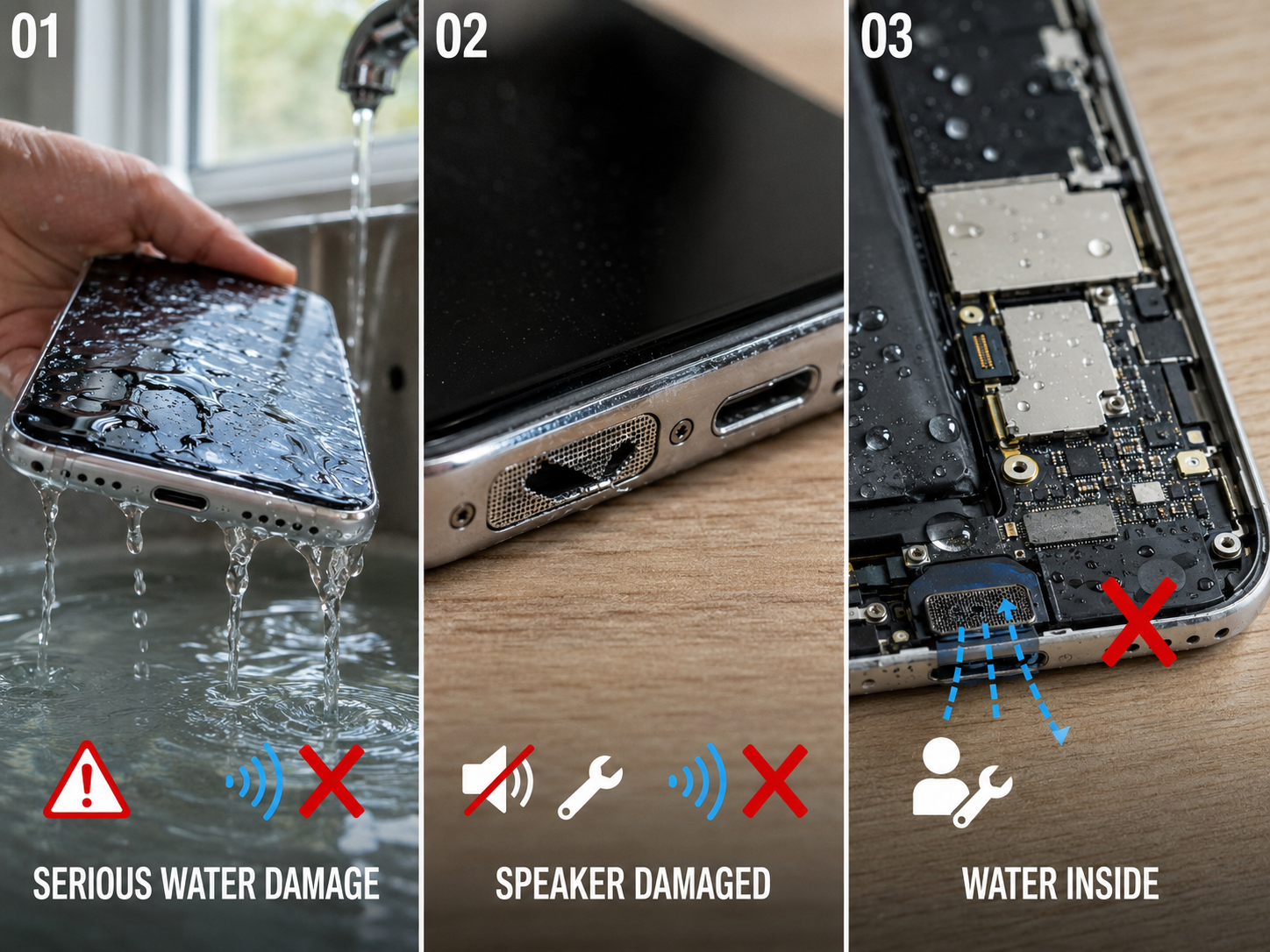
This sound tool is made for the phone speaker. It can help play sound through the speaker, but it cannot solve every phone water issue.

If Your Phone Has Serious Water Damage

If your phone has fallen into a lot of water or shows signs of damage, using a water eject sound may not help.

If Your Speaker Is Damaged

If your speaker is not working, has no sound, or has a hardware issue, playing a sound will not fix the problem.

If Water Is Inside the Phone

Water eject sound only works through the speaker. It cannot remove water from inside your phone or repair internal damage.

Three-panel realistic safety diagram showing that water eject sound cannot fix serious water damage, repair a damaged speaker, or remove water trapped inside a phone.

Frequently Asked Questions

A water eject sound plays a tone through your phone speaker. It is used to help remove water around the speaker area and check if the speaker sound improves.

Water eject sound only works for the speaker. It can help with water near the speaker, but it cannot remove water from inside the phone or repair water damage.

Yes, you can use the tool on iPhone and Android phones that support browser audio and have a working speaker.

No. Water eject sound is only for the speaker. It does not remove water from the charging port. Let the charging port dry before plugging in a charger.

Play the sound and check your speaker after it finishes. If the sound is still not clear, you can try playing it again.

Editorial & Testing Team

About the Author — WaterEject.site Team

WaterEject.site is run by its owner and a team who worked together to build and test the water eject tool. Our goal is to make the tool easy to use and its instructions easy to understand. We share practical guidance on water eject sounds and speaker checks to help visitors understand how to use the tool and what to expect.