Water Eject Shortcut for iPhone | One Tap Speaker Water Removal
iPhone speaker water removal

Eject Water From iPhone Speaker in One Tap

Got water in your iPhone speaker and now the sound feels muffled? Play our tuned sound frequency to help push water out of your speaker grill. Point the speaker downward and run a cycle until the sound clarifies.

Sound playback is strictly for the speaker grille. It cannot dry a wet Lightning or USB-C charging port, detect internal moisture, or repair liquid damage.

Explore Other Sound Tools

Looking for Other Devices or Audio Tools?

If you need to generate sound sweeps on an Android phone, check out our dedicated Android Water Eject tool, designed with tuned frequencies for Samsung Galaxy, Google Pixel, and Xiaomi models. For universal frequency tones and stereo speaker balance checks across any device, visit our main Water Eject tool on the homepage. If your iPhone speaker isn't wet but sounds distorted due to dust, pocket lint, or dry debris, switch over to our Speaker Cleaner to run deep vibrations that dislodge trapped particles from the mesh.

iPhone Water Eject

Ready
Sonic Ejection Wave iOS Tuned

Acoustic resonance pushes water droplets away from the speaker diaphragm.

242Hz

Quick Eject

00:00 / 00:24

Recommended for light splashes. Vibrates the speaker mesh to release trapped surface droplets.

55%
App Store

Liquid Detected Warning? Do not connect a charger if iOS shows a liquid alert. Wait until dry.
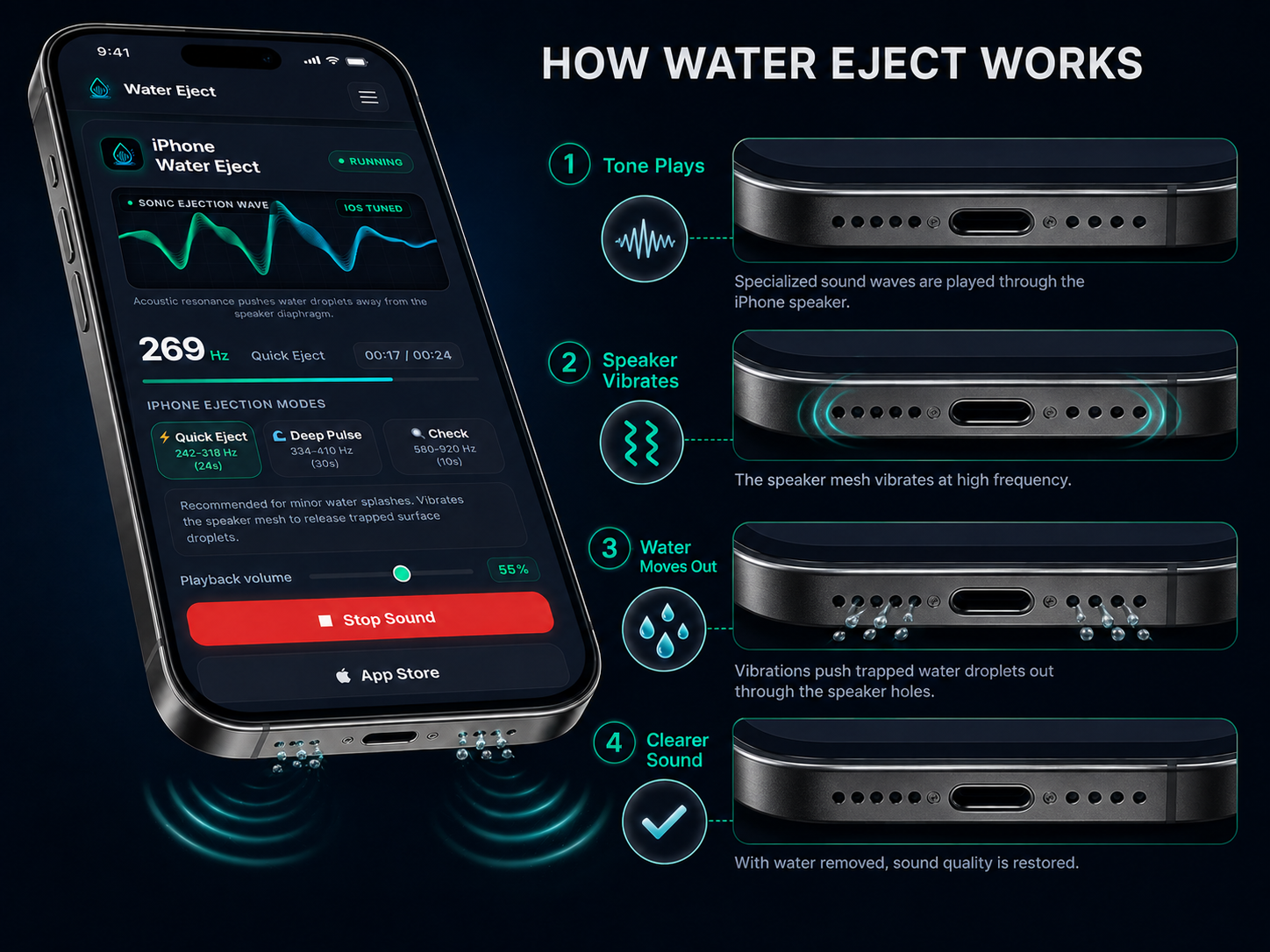
How Does the Water Eject° Sound Work?

A water eject sound plays a short tone from your iPhone speaker. This tone moves the speaker fast and may push water out from the speaker area. Use it when your iPhone sound is low, unclear, or muffled after water gets near the speaker. This is only for speaker water. It will not dry the charging port or fix damage inside the phone, so do not charge your iPhone until it is dry.

Realistic 4:3 iPhone Water Eject diagram showing sound waves vibrating the built-in speaker to push out small water droplets.

When Should You Use a Water Eject° Shortcut on Your iPhone?

A water eject shortcut on iPhone is a fast way to run speaker-cleaning sound from Apple’s Shortcuts app. Use it when your iPhone speaker gets wet and the sound does not feel clear.

If you want more sound options and better control, you can also download the Water Eject° app from the App Store. It gives you another way to use sound for iPhone speaker water removal.

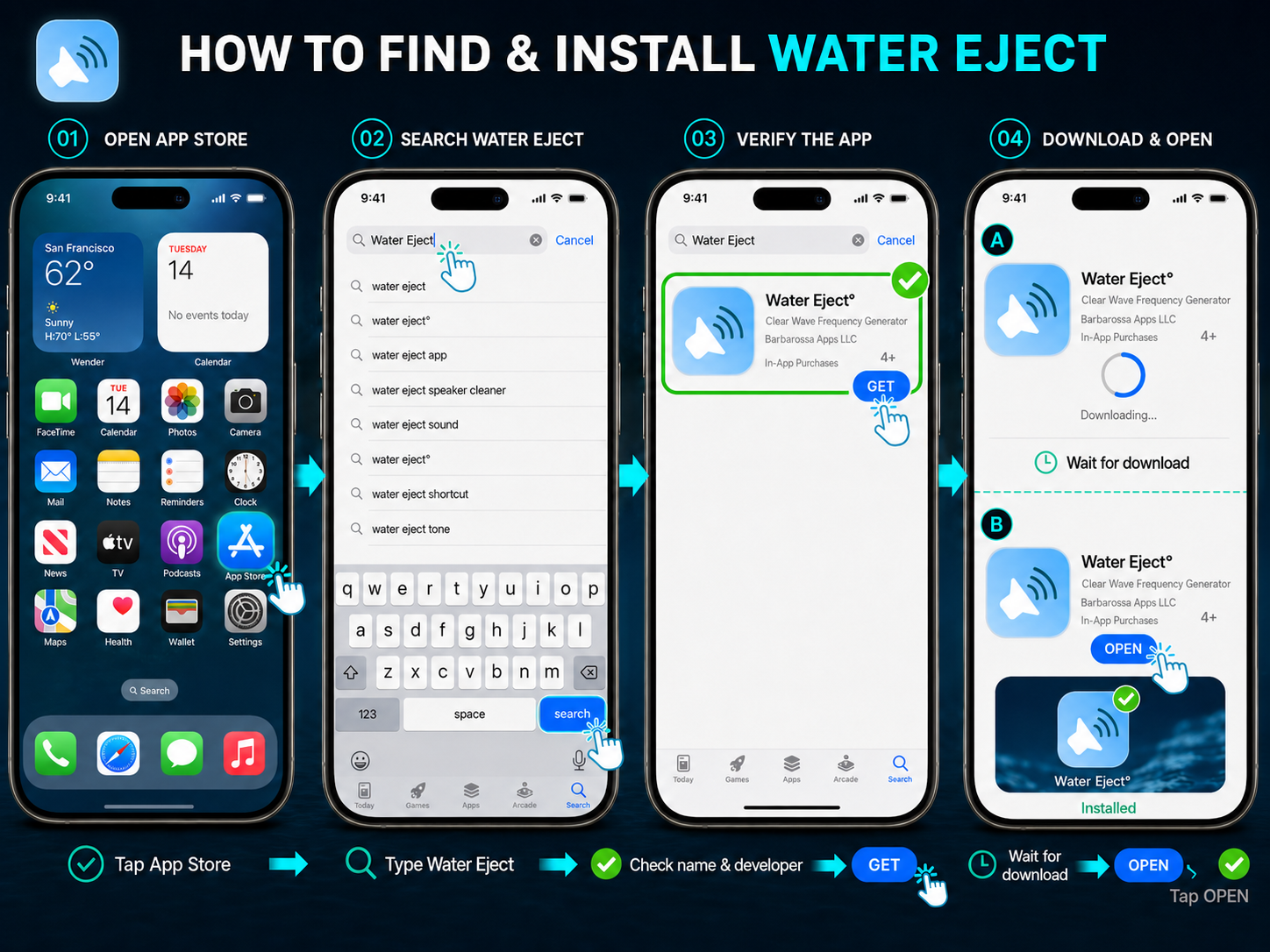
How to Find and Install the Water Eject° App on iPhone

Finding the app is simple if you check the listing carefully before installing it. Open the App Store, search the name, and confirm the app details before you tap download.

01

Step 1: Open the App Store

Open the App Store on your iPhone.

02

Step 2: Search for Water Eject°

Tap the search bar and type Water Eject°.

03

Step 3: Check the App Details

Open the app page and check the app name, developer, rating, reviews, and in-app purchase details.

04

Step 4: Tap Get or Download

Tap Get or the download icon to install the app.

Step-by-step iPhone Water Eject app installation guide showing how to search, verify, download, install, and open the official app from the App Store.

Disclaimer: Water Eject° is a third-party app and is not owned, developed, or officially affiliated with us. We found the app useful and shared this installation guide for informational purposes only. All app names, logos, trademarks, and interface elements belong to their respective owners. App features, pricing, and availability may change over time.

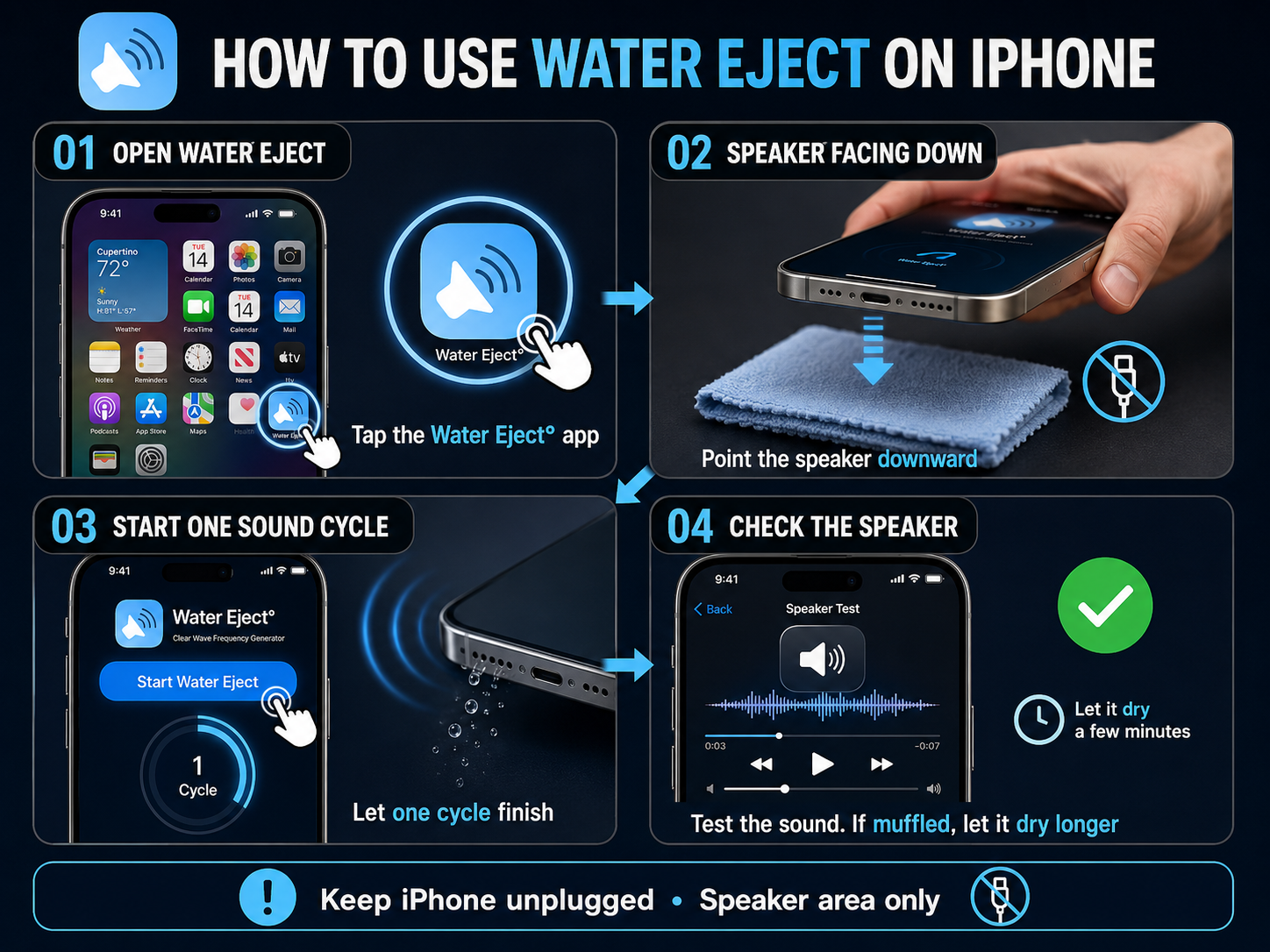
How to Use the Water Eject° App on iPhone

Once the app is installed, use it carefully and keep your iPhone unplugged. The goal is to clear the speaker area, not the charging port or inside of the phone.

01

Step 1: Open the Water Eject° App

Open the app from your iPhone home screen.

02

Step 2: Keep the Speaker Facing Down

Hold your iPhone so the speaker points downward.

03

Step 3: Start the Water Eject° Sound

Tap the water eject option and let one sound cycle finish.

04

Step 4: Check Your iPhone Speaker

Play music or a video and check if the sound is clearer. If it still sounds muffled, let your iPhone dry for more time.

Realistic 4:3 iPhone Water Eject tutorial showing how to open the app, hold the speaker downward, run one sound cycle, and check the sound.

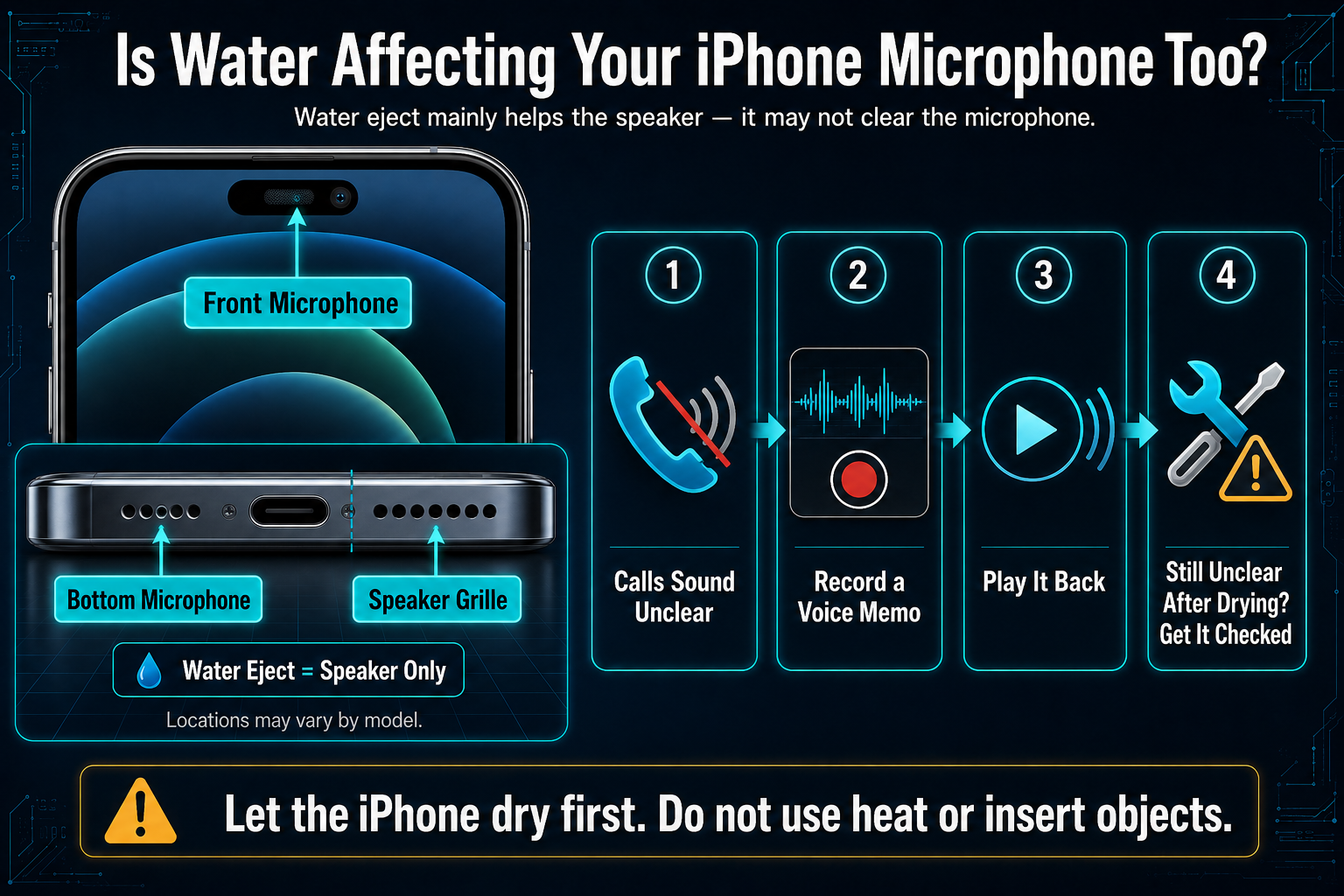
Is Water Affecting Your iPhone Microphone Too?

If your iPhone got wet and people cannot hear you clearly on calls, water may also be around the microphone area. A water eject sound is mainly for the speaker, so it may not fix microphone issues the same way. Record a short voice memo and play it back. If your voice still sounds low, blocked, or unclear after the phone dries, your iPhone may need proper checking.

Educational diagram showing the iPhone’s front microphone, bottom microphone, and speaker grille, with steps for testing unclear audio using Voice Memos.

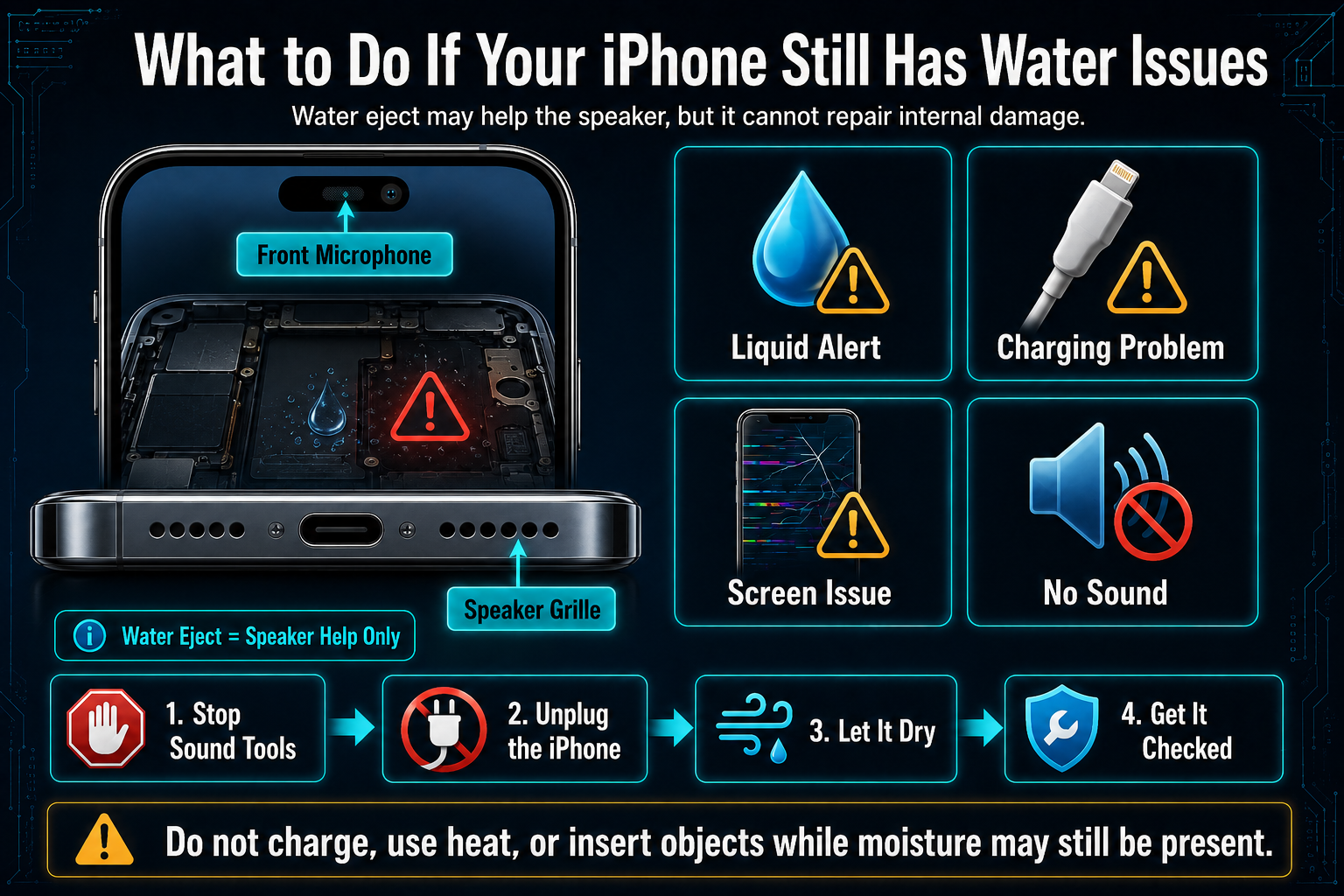
What to Do If Your iPhone Still Has Water Issues

Water eject can help with speaker sound, but it cannot repair damage inside the phone. If your iPhone shows a liquid alert, charging problem, screen issue, or no sound at all, stop using sound tools and let the phone dry or get it checked.

Educational diagram showing iPhone water-damage warning signs, including a liquid alert, charging problem, screen issue, and no sound, with safe drying steps.

Frequently Asked Questions

Yes, if your iPhone is unplugged and only the speaker sounds muffled. Keep the volume normal. Do not use it for a wet charging port or a badly wet phone.

No. iPhone does not have a built-in Water Eject° button. You can use Apple’s Shortcuts app to add a water eject shortcut on iPhone, or use the sound tool on this page.

Siri can start the shortcut if you have already added it. A Siri water eject shortcut runs sound from your iPhone speaker, but it does not dry the whole phone.

No. Water eject sound comes from the speaker, not the charging port. If the port is wet, keep your iPhone unplugged and let it dry before charging.

Run one cycle first and check the speaker. If the sound is still muffled, try one more cycle. After that, stop and give your iPhone more time to dry.

Editorial & Testing Team

About the Author — WaterEject.site Team

WaterEject.site is run by its owner and a team who worked together to build and test the water eject tool. Our goal is to make the tool easy to use and its instructions easy to understand. We share practical guidance on water eject sounds and speaker checks to help visitors understand how to use the tool and what to expect.